
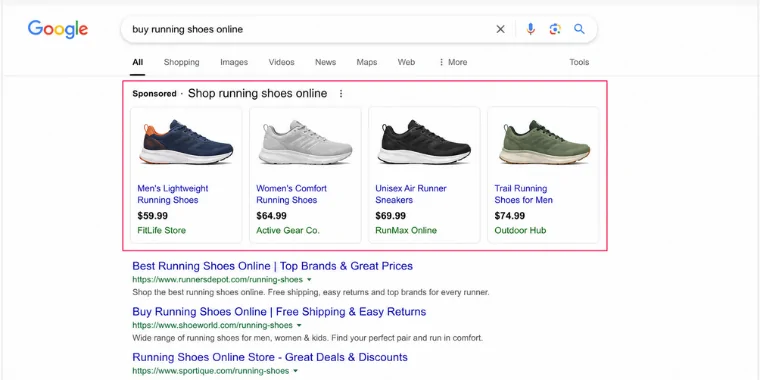
If you run an e-commerce business and you are not using Google Shopping Ads, you are likely leaving serious money on the table. While traditional text-based ads require users to imagine what your product looks like and hope the description matches what they want, Google Shopping Ads show a product image, price, store name, and ratings right at the top of search results. The decision to click becomes visual, immediate, and intent-driven.
For e-commerce businesses looking to scale revenue and reach buyers who are already ready to purchase, Google Shopping Ads are one of the most powerful tools available in digital advertising today.
Here is everything you need to know about why they work and how to make them work for you.
What Are Google Shopping Ads?
Google Shopping Ads, also called Product Listing Ads (PLAs), are visual advertisements that appear at the top of Google search results when someone searches for a product. Unlike standard text ads, Shopping Ads pull directly from your product feed in Google Merchant Center and display rich product information at a glance.
A typical Google Shopping Ad includes:
- A high-quality product image
- Product name and description
- Price and any available discounts
- Store or brand name
- Star ratings and review count
This format puts your product directly in front of shoppers at the exact moment they are searching for it, creating a highly qualified click before the user even reaches your website.
Example:
A customer searching for “running shoes for men” may see multiple product listings with images, prices, and reviews before traditional search results even appear.
This placement gives businesses a powerful opportunity to capture purchase-ready shoppers at the exact moment they are looking to buy.
Google Shopping Ads are one of the most powerful tools in e-commerce advertising — but not all Shopping campaigns are built the same. When setting up your campaigns in Google Ads today, you face a fundamental choice: run a Standard Shopping campaign, where you control bidding, product groups, and targeting manually, or use Performance Max (PMax), Google’s AI-driven campaign type that places your products across Search, Shopping, YouTube, Display, Gmail, and Discover from a single campaign.
Both formats serve PLAs. Both can drive strong revenue. But how they work — and who they work best for — is very different.
How Google Shopping Ads Directly Increase Revenue?
Beyond clicks and impressions, here is how Shopping Ads translate into measurable revenue growth for e-commerce businesses.
- Higher Conversion Rates at Lower Costs
Studies have shown that Shopping Ads can deliver conversion rates up to 30% higher than standard text ads for e-commerce. Shoppers who click on a Shopping Ad have typically already seen the product image and price, meaning they arrive at your site further along in the buying journey and far more ready to complete a purchase.Key Insight: Lower funnel traffic equals higher conversion rates. Google Shopping puts your products in front of people who are searching with purchase intent, not just browsing or researching.
- Increased Average Order Value
Smart Shopping campaigns allow you to promote your full product catalog across Google Search, Display, YouTube, and Gmail simultaneously. This multi-channel exposure does not just bring in single-product buyers. It keeps your brand visible across the customer journey, encouraging upsells, cross-sells, and repeat purchases. - Remarketing Built Right In
Google’s Performance Max and Smart Shopping campaigns include built-in remarketing capabilities. This means that if a shopper views your product but does not buy, they can be retargeted with that exact product as they continue browsing the web. This follow-up visibility dramatically increases the chances of recovering abandoned sessions and turning browsers into buyers.
The Key Components of a High-Performing Shopping Campaign
Running Google Shopping Ads is not simply a matter of uploading your products and waiting for sales. The campaigns that consistently drive revenue share several critical elements.
1. Optimized Product Feed Your product feed is the backbone of every Shopping campaign. Every title, description, image, price, and category must be accurate, detailed, and optimized for the way real shoppers search. A poorly structured feed means your ads show up for the wrong searches or do not show up at all.
2. Compelling Product Images Google Shopping is a visual format. Low-resolution, cluttered, or unprofessional product images will hurt your click-through rate regardless of how competitive your pricing is. Clean, high-quality images on a white background consistently outperform lifestyle photos for direct-response Shopping campaigns.
3. Strategic Bidding and Budget Allocation
- Bid higher on products with strong margins and proven conversion history
- Segment campaigns by product category, price range, or performance tier
- Use target ROAS (Return on Ad Spend) bidding to automate efficiency at scale
- Regularly review search term reports to add negative keywords and eliminate wasteful spend
4. Competitive Pricing Signals Google’s algorithm factors in price competitiveness when determining when and where your Shopping Ads appear. Keeping your pricing sharp, and highlighting promotions like free shipping or limited-time discounts, improves both ad visibility and click-through rates.
Common Mistakes That Kill Shopping Ad Performance
Even well-funded campaigns can underperform when these mistakes are present:
- Ignoring the product feed: Treating the feed as a one-time setup rather than an ongoing optimization asset
- No negative keywords: Allowing ads to show for irrelevant searches burns budget fast
- Lumping all products together: Running everything in one campaign prevents efficient budget control and performance analysis
- Skipping mobile optimization: A significant portion of Shopping clicks happen on mobile; a slow or poorly designed mobile checkout destroys conversion rates
- Not tracking properly: Without accurate conversion tracking, you cannot identify what is working, and you will optimize in the wrong direction
Shopping Ads by the Numbers
Here is a quick snapshot of why e-commerce brands continue to invest heavily in Google Shopping:
| Metric | Shopping Ads Performance |
|---|---|
| Share of Google paid clicks (retail) | Up to 76% |
| Average CTR vs. text ads | 1.91x higher |
| Conversion rate advantage | Up to 30% higher |
| Revenue share for e-commerce advertisers | Majority of paid revenue |
These numbers reflect campaigns that are properly set up, continuously optimized, and managed with a clear strategy. Results vary, but the potential is significant for nearly every e-commerce vertical.
Who Benefits Most from Google Shopping Ads?
Google Shopping Ads work across a wide range of product categories, but they tend to deliver the strongest results for:
- Retail and fashion brands with large product catalogs
- Home goods and furniture businesses with visually driven products
- Electronics and tech sellers competing on price and specifications
- Health, beauty, and wellness brands with repeat-purchase potential
- Specialty and niche products with defined, high-intent search audiences
Whether you are a local Toronto retailer looking to expand your digital footprint or a national e-commerce brand scaling into new markets, a well-run Shopping campaign can accelerate your growth significantly.
Why Google Shopping Ads Outperform Traditional Text Ads for E-Commerce?
Google Shopping Ads consistently deliver higher click-through rates, better conversion rates, and lower cost-per-acquisition than standard search ads for product-based businesses. Since humans process images far faster than text, a well-optimized product photo triggers buying decisions instantly. Displaying the price upfront also filters out casual browsers, bringing in higher-quality, purchase-ready traffic. Shopping Ads appear above organic results and standard text ads, giving your brand maximum search real estate — and because campaigns are driven by your product feed rather than manually selected keywords, Google’s algorithm automatically matches your products to relevant searches, saving time while surfacing opportunities you might never have targeted on your own.
Performance Max vs Standard Shopping: Which Is Right for You?
Both campaign types can drive strong Shopping results — but they suit very different business needs. Use this breakdown to make the right call for your account.
| Feature | Performance Max (PMax) | Standard Shopping |
|---|---|---|
| Ad Placements | Search, Shopping, Display, YouTube, Gmail, Discover, and Maps — all within a single campaign | Google Search results and Shopping tab only |
| Ad Formats | Text, image, video, and responsive assets combined through AI-driven creative mixing | Product Listing Ads (PLAs) only — product image, title, price, and store information |
| Bidding Control | Fully automated; set a target ROAS or CPA and Google manages bidding | Manual CPC, Target ROAS (tROAS), or Smart Bidding options |
| Keyword Control | No direct keyword targeting; limited control through search themes | Full support for negative keywords and query filtering |
| Audience Targeting | Audience signals act as suggestions; Google may expand beyond them | Audience bid modifiers and remarketing lists (RLSA) can be applied directly |
| Product Grouping | Asset groups organized by product category with limited granularity | Detailed product grouping by brand, category, custom label, item ID, and more |
| Search Term Reports | Limited visibility; only top search categories are available | Full search term reporting for optimization and negative keyword management |
| Performance Reporting | Channel-level insights; difficult to isolate Shopping performance | Product-level and query-level reporting with greater detail |
| Creative Visibility | Automated asset combinations with limited asset-specific reporting | Not applicable; performance is primarily feed-driven |
| Setup Complexity | Lower setup effort; one campaign can cover all Google channels | Requires campaign structure and product group planning |
| Learning Period | Typically 4–6 weeks; performance may fluctuate during learning | Faster ramp-up and quicker response to bid adjustments |
| Ongoing Optimization | Less hands-on management but fewer optimization levers | More management required, with greater control and flexibility |
| Best For | Businesses seeking cross-channel growth, broader reach, and scalable automation | Retailers requiring granular control, query insights, and product-level ROAS optimization |
| Avoid When | Budgets are limited, brand safety is a concern, or query-level control is essential | Cross-channel reach is a priority and managing multiple campaign types is not practical |
| Budget Requirements | Typically performs best with larger daily budgets ($50–$100+ per day) | Can perform effectively with smaller budgets and tightly structured product groups |
Why Professional Management Matters?
While Google Shopping Ads offer tremendous potential, successful campaigns require ongoing management.
Many businesses struggle with:
- Product feed optimization
- Bid management
- Audience targeting
- Campaign structure
- Conversion tracking
- Performance analysis
Without proper management, advertising budgets can be wasted on underperforming products or poorly targeted traffic.
This is why many businesses partner with experienced PPC specialists who understand how to maximize Shopping campaign performance.
Ready to Grow Your E-Commerce Sales with Google Shopping Ads?
Google Shopping Ads can be one of the most profitable advertising channels for online retailers when properly managed. From increasing product visibility and attracting high-intent buyers to improving conversion rates and driving scalable revenue growth, Shopping campaigns offer powerful opportunities for e-commerce businesses.
Pat’s Marketing is a Toronto-based digital marketing agency specializing in SEO, Google Ads, PPC management, and website design. With over 18 years of experience and Google Partner certification, our team creates customized advertising strategies designed to generate measurable results and maximize ROI.
We take the time to understand your products, customers, and business goals to build Shopping campaigns that drive real sales and long-term growth. As a results-driven PPC agency in Toronto, we do not believe in one-size-fits-all campaigns. Everything we build is tailored specifically to your business.
Call 1-888-488-7287 today for a free consultation and discover how our PPC marketing in Toronto can help your e-commerce business increase sales and revenue.


